
Most Japanese apartments and houses are equipped with an intercom system (ドアホン / doa-hon) for communication between your door and living area.
This system may also include video, recording, and unlocking features depending on the model.
This guide explains how to use, common functions, and what to do if your intercom stops working.
🏠 1. Basic Types of Japanese Intercoms
| Type | Japanese Name | Features |
|---|---|---|
| Audio only | 音声ドアホン | Voice communication only |
| Video intercom | テレビドアホン | Includes camera and monitor screen |
| Intercom with door unlock | オートロック付きドアホン | Allows unlocking the main entrance |
| Wireless intercom | ワイヤレスドアホン | Portable or battery-powered handsets |
💡 The most common brand in Okinawa properties is Panasonic or Aiphone (アイホン).
If unsure, check the brand name on the device or near the screen.
🎥 2. How to Use the Intercom
🔹 When a Visitor Arrives
The intercom will ring or chime (ピンポーン) when someone presses the button at your entrance.
On the main indoor unit, you’ll see the visitor’s image (if video intercom).
Press the 通話 (つうわ / Talk) button to speak with them.
Press the 終了 (しゅうりょう / End) or 切 (きり / Off) button to end the call.
💡 Some models automatically record a photo or short clip when the visitor rings.
🔹 To Unlock the Door (If Auto-Lock System)
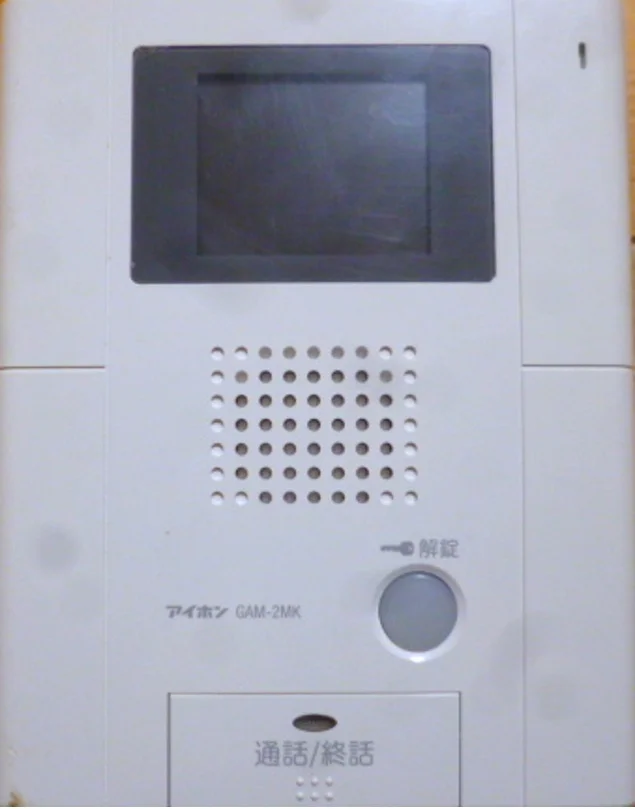
Press the 解錠 (かいじょう / Unlock) button on the screen or panel.
Wait a few seconds — you may hear a click before the main door unlocks.
⚠️ Only use the unlock button if you know the visitor.
🔹 To Adjust Volume or Screen
Use the 音量 (おんりょう / Volume) buttons to make the chime louder or softer.
For brightness or contrast, use 明るさ (あかるさ) settings if your model includes it.
🔋 3. Troubleshooting When the Intercom Is Not Working
If your intercom screen or sound stops working, follow these steps:
🔹 Step 1: Check the Power Source
Most intercoms are connected to the wall outlet or directly to house wiring.
Ensure the breaker is ON and the outlet is working.
If your intercom has a plug adapter, make sure it’s securely inserted.
💡 Test the outlet by plugging in another device (like a phone charger).
🔹 Step 2: For Battery-Powered Models
Some wireless intercoms or sub-monitors run on AA batteries or rechargeable lithium packs.
Open the battery cover at the back.
Replace all batteries with new ones of the same type.
Reinsert firmly and wait a few seconds for the system to reboot.
⚠️ Weak batteries often cause the screen to flicker or sound to fade.
We recommend using Panasonic Eneloop or Duracell alkaline batteries.
🔹 Step 3: Check the Cables or Mount
For wall-mounted systems, ensure the cable connectors between monitor and door unit are tight.
For door cameras, clean the lens gently with a soft cloth.
If recently painted or cleaned, make sure no water entered the outdoor speaker.
💡 Heavy rain or typhoons can cause temporary disconnection; it usually restores automatically when dry.
🔹 Step 4: No Power or Screen Still Black
If the intercom still doesn’t turn on after checking power and batteries:
Check the breaker panel for any tripped switch labeled “インターホン” or “通信機器”.
If it’s on but the screen remains dark → contact Saki Corporation for inspection.
📧 Submit your maintenance request here
🧰 4. Common Issues and Fixes
| Issue | Possible Cause | What to Do |
|---|---|---|
| No sound when visitor rings | Low volume or speaker dust | Adjust volume / clean unit |
| Screen not showing | Power disconnected or dead battery | Check power / replace battery |
| Cannot hear visitor | Faulty button or connection | Restart / contact maintenance |
| Cannot unlock door | Auto-lock system malfunction | Contact building management |
| Beeping sound | Low battery or system alert | Replace batteries |
💡 If the intercom suddenly beeps every few seconds, it usually means battery replacement is needed.
🧾 5. Tenant Responsibility
| Maintenance Item | Responsibility | Notes |
|---|---|---|
| Replace batteries in wireless intercom | Tenant | Use same size and type |
| Cleaning screen and speaker | Tenant | Wipe gently with dry cloth |
| Reconnecting power plug | Tenant | Ensure securely connected |
| Internal wiring / system fault | Management | Contact Saki Corporation |
💡 Battery replacement and regular cleaning are part of tenant responsibility.
If you’d like Saki Corporation to replace the battery for you, a service fee will apply for dispatch and labor.
📅🚨 6. When to Contact Saki Corporation
Please contact us if:
The screen remains black even after replacing batteries.
You cannot hear or speak through the intercom.
The outdoor intercom or camera is physically damaged.
The unit emits continuous beeping or error message.
📧 Submit your maintenance request here
We’ll help arrange repair or replacement with the manufacturer if needed.
Comments
0 comments
Please sign in to leave a comment.